Posts

PRESS RELEASE!!! GAE2024 Now on Apple Appstore and Google Play
Image
  We are pleased to announce that our Great American Eclipse 2024 App (GAE2024) is now available in  Apple App Store and Google Play Store!   under the GAE2024 icon.   ·           GAE2024 represents the 1 st  in an exciting series of mobile learning apps under the brand names TPEP™ and “40 Words for Bright Futures”™ , developed by Perennial Preparedness of North Carolina , in collaboration with Youth Exploration Services. The app contains 40 words relating to eclipses and other astronomical objects, pronounced in English and Spanish, along with information on history makers in space sciences and exploration. The next Great American Eclipse takes place on April 8, 2024.    ·           TPEP™ apps are unique in that the primary app features are fully functional, without the need for internet,  after initial download.  This is done in considerati...
Exciting Update! New App project

Image
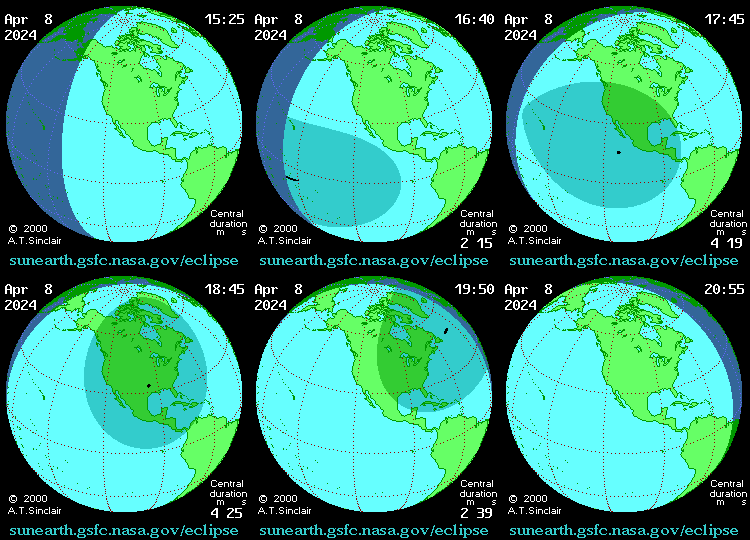
Exciting Update! Back on 5/10 We posted a " wrap-up" update for the Beaconeer™Lite and informed you that we had moved on to new project. Actually we revisited an earlier app project begun in 2016 called “ TPEP Eclipse 2017 and Beyond ”, an Android app with 40 words in English and Spanish, relating to Eclipses and other Astronomical objects. The goal was to use this app as a “template” for future apps, to encourage A+ English Competency, Bilingual Proficiency, and Civic Engagement. However, at that time in 2016/2017, there was no cross-platform coding tool, accessible to youth learning, that enabled us to create the iPhone counterpart. All of that changed in 2020 with the availability of Thunkable X. So, here we are, just three weeks later! Not only did we complete an updated 2024 Android version, to be uploaded soon to Google Play, we have completed the iPhone version also. We submitted the IOS version GAE2024Beta2 to App Store on 5/28 at 2:35, and by 5:53, the same day, we ...

5/10/2021 Update on beta-testing Beaconeer™Lite

Image
  Hi Everyone!   We thank you all for testing the Beaconeer™Lite app. Your participation helped us to establish code integrity of our app. There were no legitimate crashes due to code errors. (The one "white screen" crash was actually related to the Test Flight   app, not Beaconeer ™ Lite ).  We also received feedback that our GPS accuracy within a radius of 16ft to 105ft at ground level , was acceptable to users from both the general public and emergency response professionals.   However, we ran into a snag.  iPhone 8’s are unable to send an SMS (consisting of text message and GPS location) to Android phones. We are still trying to determine if this is an iPhone 8 settings issue or Phone Service Carrier issue, i.e. AT&T vs T-Mobile/Sprint. Therefore we will continue Test Flight beta-testing of the Beaconeer™Lite app for the foreseeable future until we are able to resolve this issue.  We have decided not to submit the app for final review...

Update on Beta Testing 3/20/2021

Image
  Hi!  We continue to need beta-testers for additional survey feedback!    We’ve had good response on GPS accuracy, testing within a radius of 16ft to 105ft under most indoor and outdoor conditions. However, we've been made aware of some issues:   Some iPhone 8 users are unable to send “beacons” to Android phones. Some iPhone 11 users are getting a “white screen” after accepting the EULA. Therefore we need more iPhone 11 beta testers to determine why this is happening and to fix it! That's why beta-testing and YOU, as beta-testers are so important!   Your feedback is CRUCIAL!  Please remember to complete the survey (link below)  after testing. THANK YOU!  https://docs.google.com/forms/d/e/1FAIpQLSc5YVo4c7QTD964DvjrqUELBE1rAymQfrTap6XMPmFcuZ2iHA/viewform?vc=0&c=0&w=1&flr=0&gxids=7628   www.Beaconeer.US

Steps in the TestFlight beta-testing process for Beaconeer™Lite, build#202111489

Image
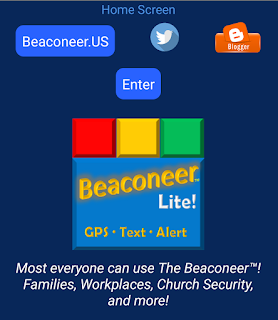
Hi Beta Testers, Thanks for the feedback. Keep it coming!  Here's how the TestFlight beta-testing process should proceed , for  Beaconeer ™ Lite, build#202111489.  Purpose of beta-test : To assess whether the accuracy of the GPS location is within a radius of 16ft to 105ft of the user's actual location. This test is for iPhones only. It is assumed you have downloaded the free  TestFlight app from  https://testflight.apple.com/     To begin testing click on this link   https://testflight.apple.com/join/Pi4VuTnD    Follow the TestFlight prompts and click on "Start Testing"  1 . At initial use of  Beaconeer ™ Lite, you will first see the   "Splash" Screen with the Beaconeer ™ Lite logo  2. At the "Home" screen click on the text as shown below. It will take you to the EULA page. 3 . At the EULA page , SCROLL to BOTTOM to ACCEPT the END USER LICENSE AGREEMENT 4. Once you accept the EULA, you will be sent...

WANTED...Beta-testers for Beaconeer™Lite GPS accuracy!

Image
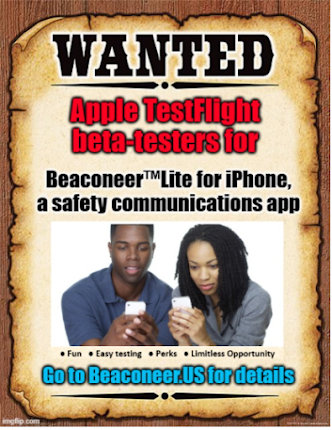
  Hi There!  We are seeking volunteer *TestFlight beta-testers, 18 yrs +, to test the GPS functionality of our Beaconeer™Lite app on your iPhone. As the app developers, we want to make sure that the Beaconeer™Lite app will generate reliable Longitude, Latitude, and Vicinity address information, when initiated by the app user. This beta-test is fun and easy-peasy! If you are interested in learning to develop iPhone apps that can make a positive difference and earn revenue, this volunteer opportunity is for YOU!  Learn to test iPhone apps first! Add "iPhone Test Flight Beta-Tester" to your resume! Before you test the Beaconeer™Lite Build Version #202111489, a few facts about GPS and Smartphones: Exact "pin-point" address" GPS accuracy is not guaranteed with most Smartphones. Per GPS.gov , even under the best conditions, typical Smartphone GPS (Latitude, Longitude) may be accurate within a 16 foot radius. Therefore, our claim for the Beaconeer™Lite app is that GP...

"All Must Know Facts about iPhone GPS Accuracy"

Image
  Since GPS is the core feature of the The Beaconeer ™ Lite app for iPhone (currently in stage 2 beta-test) , here's an informative article to increase our user's awareness how your on-board location sensor affects accuracy of apps that rely upon it!  "Part 1: How accurate is iPhone location data? Well we can't actually state the exact figures or particularize with a term to tell the accuracy of GPS on iPhone. However, it is indeed true that the more you use a GPS based app in your device, the more iPhone GPS accuracy will increase. Also, the more GPS feature is being enabled and used, the higher the accuracy of GPS on iPhone. Putting in simpler terms, GPS or location services of your iPhone keeps on trying to get the signals and as it advances, the results of accuracy can be enhanced and assured...."  see full article, courtesy of Virtual Location 

Beta-test is over! Thank you for testing.

Image
  Hello to All Beaconeer Lite Beta-Testers! Again, THANK YOU for participating. The Beaconeer Lite app is now in Apple App Review stage.  As you will see from the image below, while we didn’t get the numbers of people testing that we would have liked , however, the number of testing “ sessions ” was over 100…and no “crashes” reported by Test Flight. That’s fantastic. Please look at our previous blog posts, on some of the “known issues” discovered during the test. If you haven’t had an opportunity already, please complete this post beta-test survey We are looking forward to sharing good news in the days to come. Peace! P. Kelly, co-Developer F. Avery, co-Developer Beaconeer ™  for Android and Beaconeer ™ Lite for iPhone. “Made by women, for women, and Everyone we care about!”

More feedback on Beaconeer™Lite beta test - Font Size

Image
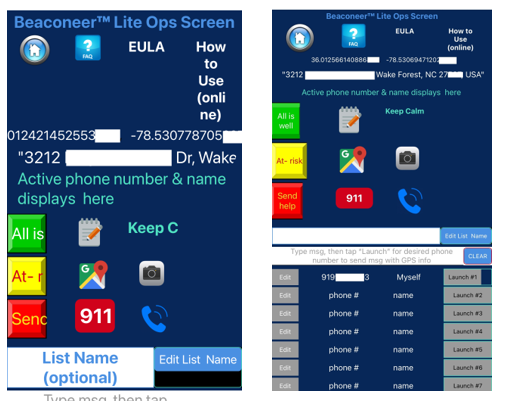
Hi Beaconeer™Lite beta testers. Thanks for the continuous feedback! One beta tester, with an iPhone6s reported that the fonts in the app were oversized and distorted, as shown below, left. Your screen should look more proportioned like the image below, right. On models prior to iPhone 10, this oversized distortion may be common. Below is the solution to getting proper resolution for Beaconeer™Lite and any other app that appears this way Try it and let us know if it DOESN'T resolve the problem. Thanks! #beaconeerlite #betatester #fontsize #oversizefont #screen #distortion

Beta testing feedback Beaconeer™Lite

Image
  We're getting great feedback on the beta-test for Beaconeer ™ Lite . Perhaps you've noticed these "slight imperfections" reported by a tester.. . "Tried it on 2 different iPhones – it passed all 4 of the tests as shown in the video. Changes to think about in a future build (I wouldn’t be surprised if you already have this in mind): 1.Make navigation between pages more intuitive (nav bar, etc.??) 2.Text field for entering phone number – the word “phone #” sticks around unless you are deliberate about removing before inputing the numbers 3.Make the button size the same (I like the colors)" ------------------------------------------------------ Here's our answers below ... Thanks so much for feedback JXXCCC... 1.We'll try out a navigation bar in next version. The reason we didn't this time is because there are only 3 screens with primary functionality, that we thought are easily accessible using the top menu buttons: Beaconeer Lite Ops Screen Edi...

Beta-testing of Beaconeer ™Lite is now in progress

Image
TestFlight is Apple.com's authorized intermediary to pre-screen and test apps submitted by an app developer.  We passed the pre-screen and pre-testing by Test Flight. Now we just need beta-testing by you, our family, friends, and colleagues!  Don’t miss the opportunity to claim your new skill designation as an Apple.com Test Flight “Beta Tester”  Beta-testing of Beaconeer ™Lite is now in progress Get started! 1- Download the Test Flight App from Apple AppStore 2 - Then click on this Test Flight link for the  Beaconeer ™Lite   https://testflight.apple.com/join/ISiVD6Fp 3- Once you finish the test, click on this link to rate the app.   https://tinyurl.com/y78fx5qr Once we are published on AppStore, you'll receive a special "Virtual Goody Bag" of enduring value at our Launch Partay! 

About the Red, Yellow, Green Beacons...

Image
Another key feature of the Beaconeer™(Android) and Beaconeer™Lite(iPhone) is the colors of the beacons: Red, Yellow, and Green. We have Garrett Morgan to thank for this universally understood "Alert" system, used all over the world in traffic control. We incorporated these colors in the Beaconeer™App!

Spotlight on GPS, Dr. Gladys West

Image
  The core feature of The Beaconeer for Android is GPS (Global Positioning System). Dr. Gladys West contributed major advances to this technology which is now used in all cell phones! Our development of The Beaconeer in 2018 wouldn't have been possible without GPS! Your support of our beta-test of Beaconeer™Lite for iPhone will further the legacy of this great woman! We dedicate all of our efforts, to get BeaconeerLite on AppStore to Dr. Gladys West #gladyswest The best is yet to come! https://tinyurl.com/ycf3bxut #GPS #beaconeer